

Best AI Agents for Beginners in 2027

Artificial intelligence is changing how people work, study, and manage everyday activities. While traditional AI chatbots help users answer questions and generate content, AI agents can take things further by completing multiple steps toward a particular goal.
From researching topics and organizing information to automating business processes, these tools are becoming increasingly useful.
If you are new to artificial intelligence, exploring the Best AI Agents for Beginners in 2027 is a great way to understand how automation works and how it can improve your productivity.
In this guide, we will explore six popular AI tools, their features, advantages, limitations, and suitability for beginners.
1. What Are AI Agents?
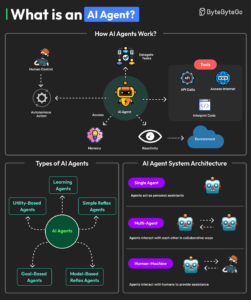
AI agents are software systems that use artificial intelligence to perform tasks based on instructions and goals.
Unlike basic chatbots that primarily respond to questions, AI agents can plan actions, use supported tools, access connected information, and complete multiple steps with varying levels of independence.
For example, imagine asking an AI agent to help prepare a blog post. It might:
-
Research the selected topic.
-
Collect relevant information.
-
Organize important points.
-
Prepare a content outline.
-
Create a draft for review.
A traditional chatbot might help with individual steps, while an agent-enabled system can coordinate several of them.
However, not every AI product has the same capabilities. Some are ready-to-use assistants, while others are automation platforms that require users to build their own workflows.
2. Best AI Agents for Beginners in 2027
Here are six useful AI assistants and automation platforms worth exploring.
1. ChatGPT Work – Best Overall for Beginners
ChatGPT is a popular AI platform for writing, research, brainstorming, and productivity.
Its Work experience is designed for longer, multi-step tasks. It can research topics, analyze information, work with connected apps, and create documents, spreadsheets, presentations, and reports.
Main features:
-
Multi-step task execution.
-
Research and information analysis.
-
Document and presentation creation.
-
Supported app and browser interactions.
Best for: Bloggers, students, freelancers, and professionals.
Coding required: No.
Free availability: Regular ChatGPT has a free plan, but Work is available on eligible paid plans.
Advantages: Easy to communicate with, versatile, and useful for different tasks.
Limitations: Work access requires an eligible subscription, and some actions need user approval.
OpenAI Help Center+2
2. Google Gemini – Best for Research and Learning
Google Gemini is another excellent choice for people who want an AI assistant for everyday productivity.
It can help explain difficult topics, summarize information, analyze uploaded documents, and assist with research.
Its connected apps feature can also help users interact with supported services, including Gmail and Google Calendar, with permission.
Main features:
-
Research and information summaries.
-
Document analysis.
-
Google app integrations.
-
Writing and brainstorming assistance.
Best for: Students, researchers, and everyday users.
Coding required: No.
Free availability: Yes, with usage limits. Advanced features may require subscriptions.
Advantages: Convenient Google ecosystem integration and beginner-friendly interface.
Limitations: Usage limits apply, and advanced features vary by subscription and availability.
Gemini Apps Help+2
3. Microsoft Copilot – Best for Office Productivity
Microsoft Copilot helps users with writing, summarizing information, brainstorming, and productivity tasks.
Its agent capabilities allow users and organizations to work with specialized assistants for particular tasks.
Copilot is especially relevant to people who regularly use Microsoft products.
Main features:
-
AI-powered writing assistance.
-
Information summarization.
-
Specialized agents.
-
Microsoft ecosystem integration.
Best for: Office users, professionals, and small businesses.
Coding required: No for basic usage.
Free availability: Copilot Chat offers access to certain agents without additional cost, while other capabilities may require subscriptions or metered billing.
Advantages: Familiar productivity environment and useful business integrations.
Limitations: Features and access depend on account type, subscription, and organization settings.
Microsoft Learn+2
4. Zapier – Best for No-Code Automation
Zapier is an automation platform that connects different applications and helps users create automated workflows.
Its AI agent capabilities allow users to build assistants that work with connected applications and business information.
For example, a content creator could create a workflow that organizes information received through a form.
Main features:
-
Application integrations.
-
AI-powered automation.
-
Workflow templates.
-
Task automation.
Best for: Freelancers, creators, and small businesses.
Coding required: No for basic workflows.
Free availability: Yes. The free plan includes 100 tasks per month and access to free versions of Zapier Agents and other tools.
Advantages: Beginner-friendly automation and many integrations.
Limitations: Free-plan restrictions apply, and advanced workflows may require payment.
Zapier+2
5. n8n – Best for Advanced Automation
n8n is a powerful automation platform that allows users to connect applications, APIs, and AI models through visual workflows.
It also includes AI agent nodes for building more advanced automated systems.
Main features:
-
Visual workflow builder.
-
AI agent integration.
-
API connections.
-
Custom automation workflows.
Best for: Technical beginners, developers, and businesses.
Coding required: Not always, but technical knowledge is helpful.
Free availability: A free self-hosted Community Edition is available. Hosted cloud plans are paid after their trial.
Advantages: Flexible workflows and extensive customization.
Limitations: More complicated to learn than ordinary AI assistants. Self-hosting also requires technical setup.
n8n.io+2
6. Langflow – Best for Building Custom AI Agents
Langflow is an open-source platform for creating AI applications and agent-based workflows using a visual interface.
Users can connect different components to create custom AI systems without manually writing every part of the application.
Main features:
-
Visual AI workflow development.
-
Custom agent creation.
-
Model and tool integrations.
-
Reusable application templates.
Best for: AI enthusiasts, developers, and people interested in building custom assistants.
Coding required: Not for every visual workflow, but Python and technical knowledge are useful.
Free availability: Its open-source version is available.
Advantages: Flexible, customizable, and suitable for experimenting with AI applications.
Limitations: Installation, configuration, and deployment can be challenging for complete beginners.
Langflow Documentation+1
3. How to Choose the Right AI Agent
Choosing an AI agent depends on what you want to accomplish.
Before selecting a platform, consider these factors:
-
Ease of use: Choose an interface that you can understand without extensive tutorials.
-
Pricing: Check free-plan limitations before purchasing a subscription.
-
Integrations: Make sure the platform supports the applications you already use.
-
Privacy: Understand how your information is stored and processed.
-
Automation: Check whether the tool can actually perform your required tasks.
-
Learning requirements: Avoid complicated platforms if you are completely new to automation.
For most beginners, starting with ChatGPT, Gemini, or Copilot is a practical choice. You can explore Zapier, n8n, and Langflow when you want more advanced automation.
4. How to Start Using AI Agents
You do not need programming experience to begin exploring AI agents.
Follow these five simple steps:
-
Identify a repetitive task: Find something you regularly do, such as organizing notes or researching blog topics.
-
Select a suitable AI agent: Choose a platform that supports your requirements.
-
Give clear instructions: Explain what you want the AI to accomplish and provide relevant information.
-
Test with a low-risk example: Start with a small task before allowing more extensive automation.
-
Review the results: Check the output, correct mistakes, and maintain human oversight.
Practical example: Suppose you run a technology blog. You could ask an AI assistant to research an upcoming technology topic, organize important findings, and prepare a blog outline. You can then verify the information and write or edit the final article.
Always protect personal information and carefully review permissions before connecting your email, files, or other accounts.
5. Benefits and Limitations of AI Agents in 2027
AI agents offer several potential benefits across different industries.
Benefits:
-
Students can organize study materials and understand difficult subjects.
-
Bloggers can research topics and prepare content outlines.
-
Freelancers can organize repetitive administrative tasks.
-
Businesses can automate selected customer-service and operational workflows.
-
Creators can manage information and improve productivity.
However, these tools also have limitations.
Limitations:
-
AI agents can generate inaccurate information.
-
Advanced features may require expensive subscriptions.
-
Connecting accounts creates privacy and security considerations.
-
Integrations may occasionally fail.
-
Human supervision is still necessary for important decisions.
AI agents are productivity tools, not replacements for human judgment. Their results should always be reviewed before being used in important situations.
6. Conclusion
AI agents are becoming an important part of modern technology, offering new ways to simplify everyday tasks and improve productivity.
For beginners, ChatGPT Work, Google Gemini, and Microsoft Copilot are good starting points. Zapier is worth exploring for no-code automation, while n8n and Langflow offer more flexibility for users interested in building custom AI systems.
The best AI agents for beginners in 2027 are not necessarily the most advanced ones. They are the tools that solve real problems while remaining easy to understand and affordable.
Start with one platform, experiment with a simple task, and gradually explore more advanced automation.
Want to learn more about artificial intelligence and emerging technology? Explore StarFacts23.com for more AI tutorials, technology guides, and useful digital tools.